Every Frame Perfect
Posted by ravenical 4 days ago
Comments
Comment by fasterik 3 days ago
Computer graphics is all about exploiting features of the human visual system. We perceive things differently when they're moving vs. when they're standing still. It's very possible that a "wrong" frame in isolation is the best looking one in a real-time context. We can also pick apart screenshots but these don't capture everything about how the user perceives a display in real-world lighting conditions.
I would draw an analogy to film. A fast tracking shot might look bad on individual frames because of motion blur. A wide-angle shot might make some objects look "wrong" because of optical distortion. But these are still the right choice if they have the intended artistic effect in the theater.
Comment by mrandish 3 days ago
Adding the correct blur to motion makes it appear clearer but seen as a still, it's obviously not clearer. The nuance is correct motion blur appears clearer while guaranteeing it's as clear as the human visual system can perceive moving details at that speed, so no perceptual detail is actually lost. It's a method that objectively improves perception which only works in motion. If frozen, the method breaks. Thus, evaluating motion blurred stills for clarity or interpretability is incorrect.
The rest of the article focuses on details of proper implementation while missing the opportunity to question whether some of these animations should exist at all. IMHO, motion can be a valuable affordance in limited doses but it's reached a point of overuse and, in some cases, outright abuse of the user's visual field and cognitive load. Designers (and their PMs) see it as a badge of 'Refined Modern UX' but it's devolved into a trendy gimmick aping good design without being good design.
Comment by fasterik 3 days ago
Comment by mrandish 3 days ago
Yes, I think we agree. When a thing is becoming a larger/smaller form of itself in a different place, it can be useful to cue the relationship visually with motion. But there are times when the change or displacement is minor enough, I do prefer 'just do it', even when the animation is hyper-fast. It's just more visual/cognitive clutter.
It's obviously situational, and if such motion is always very fast, consistent and well-motivated, it never rises to the level of annoying me. I might personally prefer some instances where, if the position overlaps and the size change is minor, just skipping it, but it's not 'bad'. I think the key may be that, done properly, such motion should cognitively be a 'barely there' hint. The moment a state-change animation rises to having perceivable aesthetic value, like being 'pleasing', it's too much.
As the senior product owner, I once had a new designer argue that if an animation was as fast as I wanted, no one would be able to appreciate the excellent S-curve ease-in/out. :-) I had to explain if a simple state-change animation was slow enough to be consciously 'appreciated', it had failed in its purpose.
Comment by bfung 3 days ago
Or you find out you can input as the animation happens, but when the animation finishes, you’ve lost where your input ended up and don’t know if you can backspace/delete and retype.
(Yes, I’m expressing multiple issues here w/ui & animation & input)
Comment by saratogacx 3 days ago
Comment by numpad0 3 days ago
Comment by mrandish 3 days ago
Also: Apple dumped Flash ~15 yrs ago, so whatever it is... it's very slow. The larger, more recent suspects for any "collapse of Adobe empire" would be "Adobe forcing $ubscription model" and "rise of Figma."
Comment by RunSet 3 days ago
Comment by jchw 3 days ago
It's one thing if the frame halfway through an animation looks a bit "funny", but is still completely logically correct. It is another if the intermediate state of the animation legitimately doesn't make any sense and is just the result of not really caring about what actually goes on during the animation. In that case I'd almost rather just not have the animation at all, or just have a simpler one.
Comment by jakelazaroff 3 days ago
Comment by jchw 3 days ago
Comment by wtallis 3 days ago
Comment by jakelazaroff 3 days ago
Comment by fenomas 3 days ago
Look at the youtube example - it has two pieces of UI animating from from a start point to an end point, and the paths are such that they momentarily overlap. There's nothing buggy or janky about it in motion; TFA is just saying that if you ignore the motion and take a screenshot mid-transition it looks odd. Same complaint as what GP describes, and silly for the same reasons.
Comment by jchw 3 days ago
I agree the YouTube example isn't the worst one, but also at the same time, I don't agree with you that there is nothing buggy or janky about it.
https://tonsky.me/blog/every-frame-perfect/youtube@1x.png?t=...
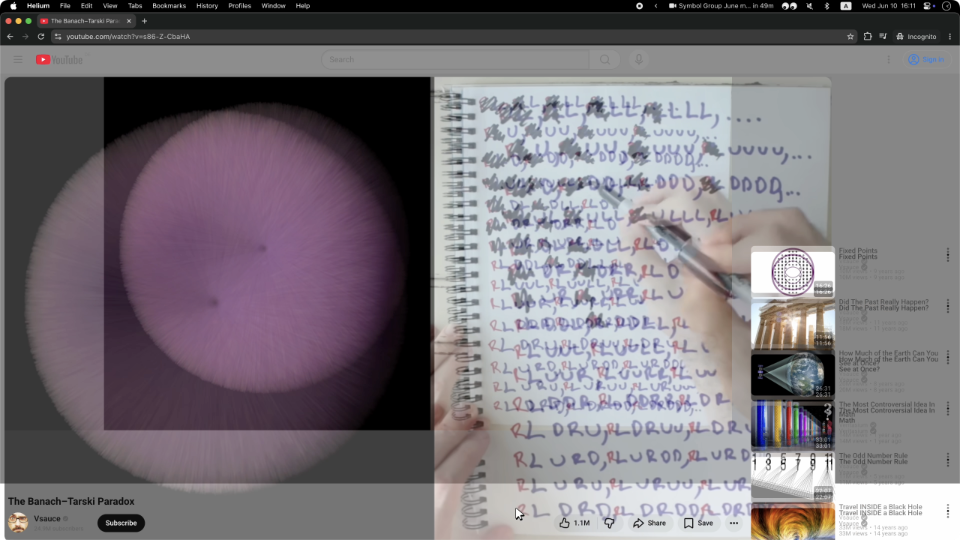
There is no logical reason for there to be two copies of the video rendered at once. The video is literally resizing into position, while all of the UI elements shift around it. Why would there be more than one copy of the thing that is resizing?
I will relent on only one thing: "If I take a screenshot of your app at any moment, it must make sense" is too strong of a statement on its own. The context that it is a screenshot of an animation is important, just like cartoon inbetween frames. However, I think if you're being generous with interpretation you can allow this to be implied.
Comment by fenomas 3 days ago
As such it makes no sense to worry about the latter thing - it's not a signal whether the animation is good or not.
Comment by Terr_ 3 days ago
That said, I think it's fair to hold most practical UIs to a different standard. Prioritizing amusement leads to a lot of strange non-ergonomic places.
Comment by LinAGKar 3 days ago
Comment by numpad0 3 days ago
GP's point is that those frames aren't broken, but they're intentional and calculated, and so they're not even relevant here.
Comment by bmurphy1976 3 days ago
Impressive and creative yes. Viewable? Not to me.
Comment by fasterik 3 days ago
Comment by jchw 3 days ago
Comment by jancsika 3 days ago
Comment by iterateoften 3 days ago
Comment by hamburglar 3 days ago
Comment by tosti 3 days ago
Comment by jcelerier 3 days ago
Comment by nvme0n1p1 3 days ago
Comment by eviks 3 days ago
Comment by jesse__ 3 days ago
I do like the point the article makes about using ui fidelity as a proxy for software quality, and agree that they pointed out some bad animations. But, I think you hit the nail on the head .. frame by frame coherence isn't the best yardstick for measuring animation "goodness".
Comment by makapuf 3 days ago
Comment by ChrisMarshallNY 3 days ago
I wouldn't mind it, if he had supplied suggested mitigations.
I think every one of those animations are system-supplied ones. Some are likely SwiftUI ones, which heavily abstract you from the iron, and, if other frameworks are supplied, the abstraction goes even farther.
It can be a major engineering effort, to improve a half-second animation.
That said, this is how designers work. I have worked with some of the top designers in the world, and it can be tempting to want to strangle them, as they choose a half-pixel alias as the hill to die on.
But if we try to work with them, it can make an enormous difference in how users react to our software.
Comment by gyomu 3 days ago
Yes, this is a major factor for the regression in overall UI quality and consistency on Apple platforms. SwiftUI aims to make all those fancy animations transitions a single line view modifier rather than 30 lines of manually specified CoreAnimation easing curves and manual animation blocks, but it results in a lot of things just feeling janky, because one-size-fits-all rule and precise polish are fundamentally at odds.
Comment by brandensilva 3 days ago
I find AI to feel real nice for pushing delight like this further than I used to have time for as it was never a priority.
Comment by eviks 3 days ago
For example?
Comment by bmacho 3 days ago
In animation (2d, 3d, stop motion) there are smear frames: https://en.wikipedia.org/wiki/Smear_frame
In this thesis you can find examples from different media, including games: https://theses.fh-hagenberg.at/system/files/pdf/Lendenfeld18...
I'm not aware of any normal software intentionally using nonsensical frames in their UI to aid perceiving motion.
Comment by eviks 3 days ago
Your example is even worse - it's a cost-driven degradation of quality
> smear frames helped to reduce production costs
> I'm not aware of any normal software
Ok, but that was the question to shift from some generic theory about how human vision isn't perfect and dynamic vs static to a practical example we can see and evaluate - just like the examples in the blog, where you can clearly see the issues both dynamically and statically
Comment by bmacho 3 days ago
No, artists (of every animated media: 2d, 3d, stop motion, video game) intentionally put extra effort into creating ugly frames.
Not based on theory, but based on taste (artists' personal taste, or measured).
It's not a cost cutting method, not anymore. It actually requires extra effort, and it makes the product more expensive.
Maybe in animated media it is an acquired taste/coconut effect and not a way to exploit our visual system.
Either way this does not say much about whether youtube should have only sensible frames or not. But it points to the direction that (intentionally) broken, nonsensical frames in UI are worth exploring--they are everywhere in animated arts. As GP has said: "It's very possible".
Comment by eviks 3 days ago
And as the reply asked: provide at least one example
> Maybe in animated media it is an acquired taste/coconut effect and not a way to exploit our visual system.
So not relevant to the original theory? Also, that'd be an example of extra effort into ugly frames that originated as cost saving measures, not quality/artistic expression methods.
Comment by ValdikSS 2 days ago
I'm quite puzzled by the article. Animations in software are transitions, it should not be perfect in UI sense, because it might look weird to the human eye in this case.
I'd prefer motion blur to something crisp. This is the case of file picker example.
Comment by eviks 2 days ago
It has a list:
> Now, what does it mean in practice?
Also, blur doesn't even look weird statically! And again, provide at least one example where it looks weird to our eyes
> This is the case of file picker example.
You also don't seem to understand what that example shows, the "blur/crisp" is not at issue here, it's, for example, "textedit" jumping on top of "where". Now explain what non-artistic human vision benefit there is to 2 words being drawn on top of one another in a UI transition instead of the first word disappearing completely before the second moves to its place.
Comment by ValdikSS 2 days ago
I do understand, and this is exactly what I consider weird. Instead of repainting (in any way, even what is considered pleasant by you and Nikita), I'd prefer blur/mosaic/white window during the animation. Not the motion blur, but just not the actual contents of the window! This breaks "every frame is perfect", you can't make a meaningful screenshot of this transaction.
In KDE's Kwin, I configure windows resizung using crude stretching algorithm. This means I see non-proportionally weirdly stretched window several frames, then it repaints. On screenshots that looks really weird, while in reality this is quite ok.
Comment by eviks 2 days ago
That wasn't the criterion, which was "the best"
> very possible that a "wrong" frame in isolation is the best looking one in a real-time context.
So show your Kwin animation example and explain how it's the best due to "human vision" compared to a transition without the weird stretches.
> I'd prefer blur/mosaic/white window during the animation
You mean blur where no content is visible/readable (that's different from the animation examples where text is visible, is moving, just not crisp)??? That's another reason you should just answer the initial question directly and provide a UI animation example supporting the theory instead of keeping arguing with nothing to show for it.
And again, what features of "the human visual system" does white window exploit that makes it the best?
Comment by ValdikSS 2 days ago
Yes. Making perfect transition animations for the software is a very hard task, which is totally useless in my opinion — transitions shouldn't be made for screenshots, it should be made for humans to understand what have changed, how did click influence the UI.
>So show your Kwin animation example
https://litter.catbox.moe/s6ahsjybdcfkvdi5.mp4
>explain how it's the best due to "human vision" compared to a transition without the weird stretches.
Simple: Nikita's file picker example tries hard to repaint in time, and that looks very weird, because it's both janky and not how the window usually repaints.
And the latter is what the human eye and human brain are consider weird. If the animation does not attempt to present the contents during the animation, but instead only acts as a transition from state 1 to state 2 using smooth (as in constant-FPS) action, it does it job better, even if it does not preserve or even present the real contents during the animation.
The example of it could be seen on many websites which show the web page elements templates during loading (elements are positioned on their places but don't have real data yet).
>And again, what features of "the human visual system" does white window exploit that makes it the best?
If you present crispy sharp, high-fps picture to the user, the brain would look for any animation deficiencies, nitpicks.
If you just hide the contents in some way (blur, no repaints, no data), the brain just won't try to find anything weird.
Comment by eviks 2 days ago
But that's exactly where you fail with bad transition - they make the understanding harder! For example, in your video the file name text/icon is moving from the center to the left, but transition animation is showing it stretching horizontally instead, and nothing re the actual move! This is bad and serves no purpose, just creates visual noise and as though the icon is "floating" for a split second.
> If the animation does not attempt to present the contents during the animation
But your video does present content during the animation! It's just that this content doesn't illustrate the object moving, but an unrelated transformation.
So I just don't understand what you compare here and what you think is better.
> the brain would look for any animation deficiencies, nitpicks.
You still have not given a single example of the alternative where you've exploited the brain to not notice. By the way, white flash is a noticeable deficiency
Comment by initramfs 3 days ago
I hacked a Panasonic GH1 to use 24fps in 2014. My newer camera, the GX85 includes this frame rate by default. Movies look more dreamlike in 24fps, due to the magic number of resetting some cycle every 5 seconds (24 frames in 5 seconds is 120 frames). Seinfeld was also filmed in 24fps. Maybe the jokes sounded funnier becaue of that? I don't know, but I enjoy playing games at 20- 30fps more than 60fps for the cinematic effect.
Comment by Gigachad 3 days ago
Some of this is also just learned and cultural. 24fps looks like movies because movies are 24fps and you have learned to make that association. In the same way certain color grades and aspect ratios look cinematic, just because that's a reinforced association rather than an inherent fact.
Comment by initramfs 3 days ago
Comment by rayiner 3 days ago
Maybe that’s sometimes true. But, more often, the intermediate states will contribute in a predictable way to the overall look of the animation and if the intermediate states don’t look coherent, then the animation as a whole will be hard to understand.
The examples in the article make this clear. For example, the search box where the initial text animates from the middle while the cursor starts on the left. That disconnects the text from the cursor. There’s no reason for that. It’s just shitty animation work.
Comment by willXare 3 days ago
Comment by voidnap 3 days ago
Comment by fasterik 3 days ago
The idea that I would defend screen shake is a complete straw man. How do you get from my comment to that conclusion?
Comment by voidnap 3 days ago
This is just true though. It isn't the only thing that matters but if you are creating a game or a video sometimes you do capture things frame by frame to understand why something looks off when animated.
Your film thing isn't an analogy, you are trying to say film is an example where some frames have motion blur so they don't look good, but since that's okay in film, it should be okay in software and apps. The word "good" is being overloaded to mean different things in each example. Screen shake in a video game or chromatic abberation in a film can be good in those contexts because they are the intent of the artistic direction. Maybe if you are hung up on the word "good" replace it with "appropriate" or "intentional".
Comment by m132 3 days ago
The save dialog, albeit a little shakey, is nowhere as chaotic as in your example. The buttons in Notes move between panes in a perfect seamless manner. Albeit the animation occasionally glitches out when you repeatedly focus and deselect the Safari bar, the cursor is perfectly timed with the text, only fading in after the text is done moving to the left. The Preview bug must be something recent too, I can't reproduce this.
I miss it when companies like Apple, Sony, and IBM paid attention to the smallest details. Apple in particular earned its current valuation with the iPhone, an all-touch device that did nothing extraordinary compared to Windows Mobile and Symbian PDAs of the time (and was in fact functionally lagging behind compared, failing to even match the then-contemporary feature phones in some areas) BUT one that you didn't actually want to smash against a wall after a few minutes of use. Now these animations are bringing back exactly the Windows Mobile and Symbian vibes.
Remember how happy Steve used to be with OS X animations? He would replay them on stage multiple times, in slow motion. These though, these would have the people behind them face the fate of the iPhone 4 antenna man.
Comment by inatreecrown2 3 days ago
Comment by vostrocity 1 day ago
The move away from skeuomorphism made it acceptable for UI elements to do things that make no sense.
Examples:
1. https://photos5.appleinsider.com/archive/13.06.15-Homescreen...
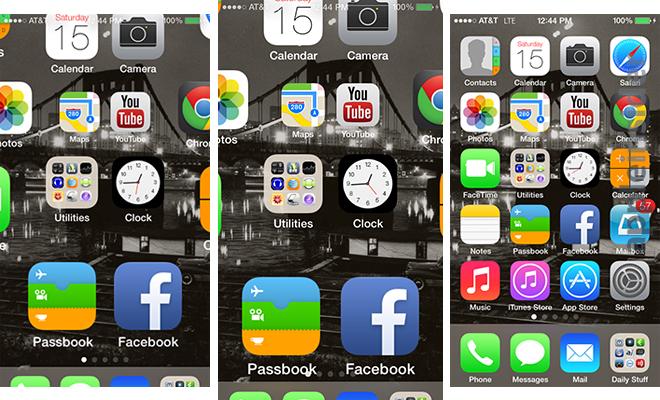
The status bar is unreadable on in-between frames, whereas in iOS 6 there was no such problem.
2. https://youtu.be/XawiZc8qmWA?si=vqT-JEYf0NDp8I9o&t=461
Play it at 0.25x and notice the app opening animation.
In iOS 6, the status bar is never unreadable for a single frame.
In iOS 7, the status bar is first obstructed by home screen icons animating under it, then obstructed by the dock animating over it, and finally it fades away while a new status bar is drawn on the app that is being opened.
It irks me to no end that iOS handles the status bar this way to this day. In the app switcher, every app card is drawn with a blank area at the top [1] where the status bar would go, when really the status bar should be permanently at the top and the app card should not include space for the status bar (webOS figured it out before iOS 7 [2]).
Comment by ikesau 3 days ago
At the same time, why does everything need motion? My understanding is that motion should be used if an action subtly changes the UI in a region that's different from where the action was triggered (e.g. toasts)
I think many of these transitions are unnecessary and would feel just as good if they snapped immediately with instantaneous reflow.
Comment by bee_rider 3 days ago
The cursor appears on the left because that’s where the user will actually start writing. I assume that’s where people look, if they know the UI. Having it appear in the middle of the screen and then move over would be unnecessary and distracting.
The stand-in text slides over to the left, to draw the attention of the unfamiliar user.
Comment by bwhmather 3 days ago
This is following a more important rule which is "Never make keyboard input timing dependent!" I'm looking at you new Windows start menu and VS Code quick open.
Comment by Hendrikto 3 days ago
Does that not still point to bad animation if for a different reason?
The animations seem to be a workflow hindrance rather than helpful.
Comment by Kiro 3 days ago
Comment by mrob 3 days ago
Compare an ordinary pencil (no animations, movement is directly tied to your hand) to a pencil with a pompom on a spring attached to the end. Which is most fun for brief use? Which would you rather write a whole page of text with?
Comment by Lalabadie 3 days ago
One of the ways to achieve this is to not actually transition between states, but simply animate the "end bounce" of an introduced element, as if it was eased into position. So not actually slid from the left, for example, but rebounding the last few pixels from an imaginary slide. Our eyes just draw their conclusions to inform us of a movement, and in exchange the component is readable and usable immediately.
[1] ~100ms represents optimal reflex time in recent research. [2] Anything that requires user attention to interact after the component appears is very comfortable with a 150ms transition. One important note is that for components you can navigate across (i.e. one key shortcut invokes a modal state, another key runs a command in that modal), experienced users will "type" consecutive shortcuts in one go, and you must have the second behaviour responsive from frame 1.
[2] Some athletes seem to train down to ~80ms on very specific reflexes, which recently lead to race-start controversies when block timers disqualify sub-100ms reactions for runners.
Comment by mananaysiempre 3 days ago
For unpredictable inputs. Intervals between a human own actions or discrepancies in delays between successive external events can be effected or perceived with significantly greater precision, especially for people with e.g. music training, especially for percussionists. I’d bet on somewhere between one and two orders of magnitude more precision, that is single-digit milliseconds, at higher skill levels. (Chopin’s Fantaisie-Impromptu is among the easier rhythm-based parlour tricks and already requires staying below ~30ms of error. Alternatively, a single frame at 60fps is 17ms, and speedrunners can hit single frames of a game pretty reliably.)
Comment by mariusor 3 days ago
Comment by mananaysiempre 3 days ago
Comment by Lalabadie 2 days ago
Comment by mrob 3 days ago
Comment by tom_ 3 days ago
Comment by pillmillipedes 3 days ago
Comment by tom_ 3 days ago
Comment by rcxdude 3 days ago
Comment by fragmede 3 days ago
Comment by amavect 3 days ago
Comment by mawadev 3 days ago
Comment by jesse__ 3 days ago
Consider a toolbar with a mix of enabled and disabled buttons. Hover effects (which I would consider animations) convey that something is clickable, and on-click effects confirm an action. These effects convey meaningful information to both beginner users and power users of any software, and are in no way inconvenient to either group.
I generally agree animations tend to get in the way when you want to get shit done, but the idea that animations are only applicable as artistic effects rings untrue to me.
Comment by mrob 3 days ago
Comment by Gigachad 3 days ago
Comment by mrob 3 days ago
That's precisely why a GUI should not be animated. No matter how I operate it, the action I use already has its own animation, e.g. my finger moving on the mouse. If I add another animation in the GUI itself that's double animation. It's equivalent to pressing a button and triggering a servo to automatically press that same button.
Comment by RunSet 2 days ago
Alternatively nothing in reality is animated and everything instantaneously snaps between states.
Comment by lynndotpy 3 days ago
Instant transitions are something I strongly prefer and use in practice. There's no question, I don't want my operating system slowing itself down to a factor (literally) of 1000x, pointlessly fading and jiggling and sliding and bouncing and wiggling. And, as this article points out, animations in operating systems often make a visually illegible mess in the meanwhile.
Animations might be a good idea in theory, but it doesn't seem like anyone has figured out how to do them right.
Comment by cwillu 3 days ago
Comment by Kiro 3 days ago
Comment by lynndotpy 3 days ago
It also doesn't matter whether it's true if the majority or not- "Instant transitions are only good in theory" is not a true statement. Instant transitions are good in practice for many people and that has been true for decades.
Comment by Liftyee 3 days ago
Maybe software programs got faster with our faster CPUs but all the animations just made everything feel slow.
Comment by lynndotpy 3 days ago
Comment by Kiro 3 days ago
Comment by toast0 3 days ago
Probably because I had run into some apps with bugs when animations are disabled, and making them run twice as fast as normal is more compatible and reduce the annoyance enough that I forget its enabled. Apps that animate at normal speed in defiance of my settings get deleted.
But I also set windows not to show window content while moving or resizing, because I find that to be annoying too.
Reducing duration or eliminating animation is one of the first settings I do on a new install.
Comment by lynndotpy 3 days ago
Your experiences are not universal.
Comment by mrob 3 days ago
Comment by Groxx 3 days ago
(I use accessibility -> reduce motion, personally. less flaky than the dev options, though also less reliable)
Comment by Kiro 3 days ago
Comment by lynndotpy 2 days ago
AOSP is not the only operating system that allows you to disable animations, even if its implementation is not the best. And yes, I still use 0x on my Android, because it's still that much better than having animations enabled.
Comment by Groxx 2 days ago
Though it does kinda often make inertial scroll/pan very bad feeling, as it jumps ahead of where you released, to where it will settle. "Reduce motion" is dramatically better there, which is a big part of why I use it.
Much MUCH more problematic is that Android (on a Pixel) has had a badly broken "recent apps" view for years now, when you have both a third party launcher and reduce motion enabled. It frequently (literally most of the time) gets stuck in its animations and won't scroll anywhere except to leap to the start or end of the list.
Comment by cwillu 3 days ago
Comment by Kiro 2 days ago
Comment by lynndotpy 2 days ago
It's not a litmus test, you are simply wrong in the way you dismiss other people.
Some of us like it at 0x, even when some apps are janky. Further, plenty of us here use desktop operating systems. Android is not the only way to get on the internet.
Both Windows (at least as of 10 and before) and most Linux distros allow you to disable animations too, and it works fine. Desktop operating systems ~15+ years ago lacked these animations entirely.
Comment by gf000 3 days ago
Short, well-done animations make for better UIs.
Comment by mrob 2 days ago
Comment by lynndotpy 2 days ago
Comment by Hendrikto 3 days ago
This is the neglected key point. None of the examples were short or well-done.
Comment by bsder 3 days ago
For a professional tool, animations are anathema. They interfere with muscle memory.
Someone who uses a program continuously can be clicking or typing before a dialog box or button is even in the right position.
My wife drives me MAD with this. She has already clicked the cancel button on a popup before I can even read the first word in the dialog box. This is fine when she is working as the dialog box is just a dumbass notification from some idiot UI designer. This is NOT fine when she has asked me to help debug a problem. I have to force her hand off the mouse so that I can read the damn error message before she clicks it away.
Comment by Hendrikto 3 days ago
Comment by voidnap 3 days ago
Comment by Groxx 3 days ago
Comment by PennRobotics 2 days ago
Kinetic scrolling on touchscreens can stay, but only because my finger doesn't have a no-friction scroll wheel.
Comment by RunSet 2 days ago
Would you rather the game have the coolest load screen in the universe or no load screens at all?
Comment by Kiro 2 days ago
Comment by cyberax 3 days ago
Comment by jayd16 3 days ago
Squash and stretch is a whole art style that relies on unrealistic frames.
Comment by jdiff 3 days ago
Comment by Krssst 3 days ago
Other applications are to do things. They should do the thing and get out of the way as fast as possible. Animation-induced delays are fundamentally contradictory with that; they waste the user's time instead of doing the thing.
Comment by embedding-shape 3 days ago
Good and useful animations communicate something, they're not there just to be there or to make it "pretty", which is most designers use them. But they can actually communicate intent, action, immediacy and other important things, if they're used sparingly in the right situations, without actually getting in the way.
Probably the most basic animation most of us PC users see every day is the very basic animation of a text cursor blinking on/off in text fields, like the one I write it right now. It's super basic, but communicates that the computer is waiting for you, it's alive and you can enter things. If it was static, you get the impression something is stuck instead, or couldn't tell exactly where the cursor is at a glance. But it blinks, and that tells us stuff.
Comment by joveian 3 days ago
I do still like progress indicators when you might be waiting on a longer task (and when it actually indicates liveness, which too often it doesn't :( ).
Games I can sometimes appreciate the new user benefits and affecting the pace can sometimes have an artistic intent or relaxation effect that tools should not normally have. I have stopped playing games for excessive animations and will usually quickly (but not always immediately) disable anything that can be disabled. It is so common that I distinctly recall the free game Strange Adventures in Infinite Space intentially doing the opposite to great effect (it has been a bit but I think it was not only instant transitions but on mouse click instead of release).
Comment by gf000 3 days ago
Comment by mrob 2 days ago
Comment by gf000 2 days ago
But then be against bad animations, not all.
Comment by mrob 2 days ago
A bounce-back animation is bad design. Bouncing is distracting and annoying. My scroll area should not bounce unless I deliberately order it to bounce. GTK has a somewhat better solution, where it shows a animated shrinking translucent chord of a circle (or some similar shape) at the end of the scroll area. This could be considered a dedicated notification area, but it's not a good one because it overlaps whatever else is in the scroll area. Ideally, the "invalid scroll" notification should be shown in the scrollbar.
Comment by Krssst 3 days ago
Comment by embedding-shape 3 days ago
Comment by TylerE 3 days ago
Comment by embedding-shape 3 days ago
Comment by 201984 3 days ago
Comment by gf000 3 days ago
Comment by pmontra 3 days ago
Reasons:
1) I'm doing that thousands of times per week, I know what's going to happen
2) It's my desktop, there is no one else who might be puzzled by a non standard behavior
3) It's faster.
By the way, it is a GNOME desktop on Debian 13.
Oops, I lied. I was about to click on Reply and I realized that the bottom panel (which on a standard GNOME is at the top) is on autohide with a short transition. Maybe because it's the only transition that I activate with the mouse pointer: I hit the bottom of the screen and while it's traveling the last pixels the bar starts sliding in. It's very fast.
Comment by krater23 3 days ago
Comment by ryukoposting 3 days ago
They don't. Most things don't. This kind of nonsense keeps an extra half-dozen people employed, and gives license to a half-dozen other people to smugly proclaim $BRAND's design language is superior to alternatives.
In most of the cases shown, it would probably feel better if the animations weren't there. I clicked the button, show me the thing. Don't do a dance and then show me the thing, just show it!
Comment by numpad0 3 days ago
Comment by RunSet 2 days ago
To hide the user interface congestion exacerbated if not caused by the ubiquitous animation.
Imagine reading a book if the letters just sat motionless. You'd need to be constantly studying the page.
Comment by tsunamifury 3 days ago
Often with out it your brain has to rescan the entire page on each refresh.
Comment by geokon 3 days ago
"Back-in-the-days" you'd click and stuff would instantly happen, and I don't remember anything being more difficult to visually interpret.
On my Kubuntu desktop if I disable all animations (the whole compositor) I don't feel there is an increased cognitive load of rescaning things - but maybe it's my preexisting memory of the UIs and certain baked in UI expectations. Maybe this animated stuff helps people that are computer illiterate? (software made for the lowest common denominator)
Comment by billyp-rva 3 days ago
Comment by cyberax 3 days ago
The key here is that animations happen outside the foveal area. Our vision is tuned to be extremely sensitive to motion and changes _outside_ the foveal area. So when something moves at the corner of your vision, it distracts your attention from your current focus.
This makes a lot of "modern" UI literally anti-productive. It actively _slows_ _down_ people and increases cognitive load.
Comment by jstanley 3 days ago
Comment by mrob 3 days ago
The notification area doesn't need animations either, because a GUI is only appropriate for displaying non-urgent notifications. If something really needs urgent attention, you need alarms and flashing lights, not an animated "toast".
Comment by tsunamifury 3 days ago
I think it should work this way vs “how it be”
Comment by voidnap 3 days ago
The only time I have to "rescan" is if I input a scroll and anticipate a scroll and it doesn't scroll. It has nothing to do with motion. In fact, in that case, I "rescan" even though the page hasn't changed, but because it doesn't match my expectation that it would change.
Comment by tsunamifury 3 days ago
Proceeds to give a self only data point
Come on guy. Think a bit.
Comment by lukeschlather 3 days ago
Comment by helterskelter 3 days ago
That said, I still prefer sway over the animated alternatives for other reasons.
Comment by silon42 3 days ago
Comment by encom 3 days ago
The only case I can think of where this is true is on scroll, and that barely counts as animation. Anything else is an irritating waste of time.
The absolute worst offence is animating page content on scroll. Great job making me wait on pointless nonsense while scanning your website for the bit I'm looking for. People who do this should be sent to reeducation camps. Both for the animation, and for disregarding 'prefers-reduced-motion'.
Comment by ikesau 3 days ago
https://tonsky.me/blog/every-frame-perfect/toolbar@2x.mp4, for example
I don't think I would have to rescan the entire page to figure out where things were afterwards. Everything's shifted to the right, just like when I open my browser bookmarks.
Comment by jstanley 3 days ago
Comment by hollerith 3 days ago
Comment by keynha 3 days ago
Comment by crystal109 3 days ago
Comment by dagmx 3 days ago
I think this is a weakly presented argument. The article doesn’t actually present stronger alternatives or even why anything shown is negative to the user. It might be negative but otherwise this is the same vacant critique that is levied by pointing at smear frame or transitional points in media to critique it.
The user also has an untenable maxim. Every frame must make sense? I would posit this is impossible, or I’d ask the author how they’d handle window resizing while keeping every frame perfect.
I also think the author themself finds it easier to point out flawed frames (again without actually explaining why they’re issues) than doing as they say. Tap the header links on their blog and see the animations play after the click is complete. Or go see their own UI projects and see how text and objects don’t stay within their containers. Surely someone saying that this is a tenet that should be followed could demonstrate it themselves.
I think this is just a very hollow critique on their end.
A more competently written article would have focused on why anything shown is bad for the end user, and how they might handle it instead. A good critique should actually include some substance and point to more than just the what, but the why and how.
Comment by Normal_gaussian 3 days ago
The article is presenting an idea, not a solution. You've failed to see this and have constructed several strawman arguments in order to critique it.
Most importantly the article does not present itself in a definite sense - it is written with care to say "I think", "Next thought:", "Probably", "So yeah.". This article is a person sharing what they are thinking, and unlike many of my thoughts - it is a fairly complete thought which is clearly sparking many other reasonable people to think along similar lines.
The author doesn't present the solution - but there is no reason they should have to. What an odd and unreasonable bar you set.
I also don't find your attacks on the authors site particularly endearing. The taste gap is well known, and punishing someone for their conceptual contribution outstripping their practical skill is quite... distasteful.
A more competently written critique would have been more charitable and in the spirit of this community.
Comment by enraged_camel 3 days ago
The article establishes an arbitrary standard, provides examples and criticizes them on the basis that they don't meet that arbitrary standard, and then... nothing.
It is easy to criticize something from the outside. Much harder to dig deep, learn the material and understand why it produces the status quo, and then propose workable solutions. That's where the actual value lies.
Comment by dagmx 3 days ago
Can it be possible to make everything during a user interaction perfect looking? What does that mean?
That was part of my original comment that you skimmed past rather than engaging with. So if you truly believe this should be a starting point of a discussion, then why not even bother taking that point to build a discussion point off of?
I’d also argue that this is not presented as just an idea. That is disingenuous. The author clearly writes “I call these situations “The technology has outsmarted the programmer” “
That is more than just a discussion point but a levied criticism at the skill of the people making things. In turn therefore they’ve set the framing of skill as part of the discussion and I don’t think it’s unfair to point out their own lack of ability to execute to their high standard.
But let’s go by your standard of saying that we shouldn’t take the authors own execution or their own words into consideration but only focus on the core idea they present.
Then that still leaves defining what they consider every frame being perfect. What are the bounds of that statement?
Comment by Normal_gaussian 3 days ago
You're constructing more strawmen.
Comment by dagmx 2 days ago
You have literally added nothing to the discussion, other than levying criticism and denigrating any points made just because you either don’t agree or don’t actually have anything material to add.
Anyway, it’s the internet. No point getting annoyed by drive by responses from a stranger. Enjoy your weekend.
Comment by Normal_gaussian 1 day ago
It is you that was levying criticism and denigrating others because you don't actually have anything material to add.
Comment by mrob 3 days ago
Comment by cloogshicer 3 days ago
Comment by amluto 3 days ago
Now it’s 30-ish years later and computers have not recovered the latency increase from compositing, double-buffering, and other attempts to make every frame perfect. If you are showing a frame on the screen that has failed to react to input that already occurred, especially more than about 20ms later, that frame is not perfect. It’s extra imperfect if the user cannot easily do what they’re trying to do while waiting for the computer to catch up with them.
But yes, most of the examples in the article are surely both imperfect in the sense the author meant and pointlessly slow, so there is no dichotomy :-/
Comment by chaboud 3 days ago
- No partially loaded content. - No relayout while content loads.
Holding those as hard rules leads to delay or rejection. Instead, while I agree it's better to have everything up front, gracefully handling cases when we don't is important, and some degree of responsiveness, even with partially loaded content, often makes for a better experience for the user than a delay.
Just be up front about it and find ways to keep continuity of relationship and smoothness. Diffeomorphic mappings are your friend...
Comment by true_religion 3 days ago
Like the issue with the osx side bar transition is that the order of operations makes no sense.
When expanding, it makes the buttons vanish only to animate their reappearance from nothing once a panel slides over them.
It would make sense in the physical world if the panel occluded the buttons during transition.
During closing, the reverse problem happens. The buttons aren’t occluded but clip through the panel like it became water.
It happens fast but not so fast that you can’t see it, and there is an unnecessary distortion.
In today’s world of AI, good taste is all we human workers have so we should call out cut corners.
Comment by inigyou 3 days ago
Comment by seemack 3 days ago
For anyone curious, https://www.thisischris.dev/projects/project-6/
Comment by Tyr42 3 days ago
Comment by seemack 3 days ago
Comment by archagon 3 days ago
Comment by naet 3 days ago
Comment by akersten 3 days ago
Comment by ryukoposting 3 days ago
Comment by jdiff 3 days ago
Comment by DavidVoid 3 days ago
Comment by sanjit 3 days ago
With MacOS I felt there was a major quality change for visual quality & animations when SwiftUI was used BY Apple for the OS and applications.
I'm not a developer, but it felt there were areas where an icon or window just didn't visually work the way it used to or SHOULD in placement or animation.
The hackish-ness hasn't changed over time: there are so many examples throughout the OS/Applications that I want to say "it was always like that", except it wasn't: Apple set the bar and it was high, the quality was exceptional.
I feel there are a lot of hacks going on with SwiftUI to achieve the same UI placement or animation.
Last quick note I think about often: a lot of analog creation was really hard. It still is. When it comes to digital we've been thinking we'll come back to things later, but never do... we build more bad on top of bad... sadly.
Comment by namuol 3 days ago
Comment by akersten 3 days ago
Wouldn't be the worst takeaway from the article. You should avoid animation for animation's sake in general. Imagine if we animated letters flying up from your phone's keyboard into the text field as you type them for example.
Comment by imathew 3 days ago
Comment by namuol 3 days ago
Comment by tosti 3 days ago
Comment by satvikpendem 3 days ago
I have mine at 0.5x and that feels sufficient, still fast but I can see apps opening and closing etc.
Comment by bvrmn 3 days ago
Comment by yellow_lead 3 days ago
Comment by intrikate 3 days ago
Comment by ryukoposting 3 days ago
The problem with 0x is that it seems to only affect like 90% of the UI. Certain things still animate, and the cadence feels awful as a result.
At 0.5x the stuff that's mysteriously unaffected by the animation speed setting isn't as jarring.
I would use 0x if it worked properly.
Comment by saati 3 days ago
Comment by embedding-shape 3 days ago
Comment by Groxx 3 days ago
Comment by embedding-shape 3 days ago
Comment by Groxx 2 days ago
Having been an Android dev who handled this stuff very carefully: yeah it's very error prone to do by hand. You have to keep in mind which animations are generally "desired" (like inertial scrolling and panning) and rebuild the stock stuff by hand to work around it if you have custom views or animations, so they don't jump around weirdly (leaping ahead of where you release, because there's where the inertia would settle).
I kinda wonder if this stuff is part of the reason for the new Jetpack Compose stuff - it makes custom views significantly more difficult, so you're very strongly incentivized to just combine stock components, where this all mostly works correctly by default.
Comment by ivanjermakov 3 days ago
Comment by satvikpendem 3 days ago
Comment by snackbroken 3 days ago
Many transitions in Android are perfectly fine at 0x animation speed. The majority of transitions that suck without animation suck because the pre-/post-transition layout sucks and the transition between the two states doesn't make sense as a result.
It's the same with several of the transitions in TFA. For example, the address bar placeholder text[1] should just be left-aligned all the time. The save dialog[2] should leave all the basic controls in their original location[3] when switching from the basic mode to the advanced mode. That means the "Where:" label should also remain in the advanced mode, and the controls[4] that pop up to replace it should either be moved to the right or below. The search bar should also be moved down.
These are some really basic details and it is my understanding Apple used to not screw them up nearly as badly.
[1]https://tonsky.me/blog/every-frame-perfect/safari@2x.mp4?t=1...
[2]https://tonsky.me/blog/every-frame-perfect/save@1x.mp4?t=178...
[3]https://imgur.com/ZpHLCsv Artist's rendition. Please excuse the minor jank and criminal amount of empty space; I couldn't be arsed to fiddle with the screenshots to get pixel-perfect positioning and shrink the advanced dialog horizontally. Bikeshedding over where exactly the new controls belong is welcomed but irrelevant to the point I'm making.
[4]Is it just me, or are their icons uselessly, impenetrably, unhelpful?
Comment by lynndotpy 3 days ago
Comment by hankbond 3 days ago
Comment by seemack 3 days ago
If you're curious, you can see it here: https://www.thisischris.dev/projects/project-6/
Comment by akersten 3 days ago
The improved versions where the elements actually transform into each other, sharing the same visual real estate, is so much better.
Comment by seemack 3 days ago
Comment by jastanton 3 days ago
Comment by flyingshelf 3 days ago
I just look at the largest tech companies in the world that with their unlimited finances cannot produce software that isn't glitchy like this.
Comment by jadar 3 days ago
Comment by ezst 3 days ago
Old Apple knew not to overdo things.
Comment by ptx 3 days ago
The result is that the indicator is not really indicating what it's supposed to (since it's out of sync with the view): It's indicating the old view when I'm already in the new one, and then it's indicating something between the old and new views, when clearly I'm not between views at all. So it's completely wrong for the entire animation until it finishes.
Comment by hk__2 3 days ago
After reading this blog post, I think the rule of thumb should be "If I take a screenshot of your app at any moment (except during animations), it must make sense". I don’t think making sense during an animation should really be a goal, as long as it makes sense before and after.
Comment by montroser 3 days ago
In an ideal world, it is hard to argue with. Yes, sure it should make sense. But also, please don't spend precious cycles on this unless all the other bugs are fixed, and this animation consistency is truly the most important remaining issue to address.
Comment by appplication 3 days ago
Comment by embedding-shape 3 days ago
Maybe I've just spent too many years as a pixel-perfect chasing frontend developer, but things can look very janky if they jump out of place during animations, compared to where they are before/after.
Comment by hk__2 3 days ago
My comment starts with "After reading this blog post"; of course I read it, but it left me totally unconvinced, especially because the author doesn’t bother showing good examples: he criticizes these and then leave you with a random raccoon animation and that’s all. For example, I don’t understand what’s wrong with the Youtube animation; it looks perfectly fine to me.
Comment by alluro2 3 days ago
Comment by hk__2 3 days ago
Comment by motoroco 3 days ago
Comment by kstenerud 3 days ago
In most UIs, it feels like they're animated for the sake of being animated. Very rarely do I say "Ah, I'm glad that was animated, because the transition would be confusing otherwise."
Things like this are part of the reason why operating systems that used to measure in the tens of megabytes now measure in the tens of gigabytes, and require chips 1000x more powerful in order to MAYBE reach the same level of snappiness (although usually not).
Comment by mbostock 3 days ago
Comment by rayiner 3 days ago
> This creates a false feeling that something subtly changes when you switch between modes. And you know what? I don’t want my UI to give me false feelings.
The animations in iOS 26 and MacOS Tahoe feel wrong. Almost like an uncanny valley. It makes the UI unpleasant to use.
Comment by skybrian 3 days ago
Comment by layer8 3 days ago
Comment by ChrisLTD 3 days ago
Comment by skybrian 3 days ago
Comment by projektfu 1 day ago
- An animation that prevents the next thing for enough milliseconds that it causes input loss. Example - the iPhone calculator that wouldn't accept the next digit until the last press was done animating.
- Animation that moves active elements like buttons out of or into the way as you are clicking/tapping, causing an errant click.
- A lack of animation or visible context change that causes you to not realize the screen has changed. This sometimes gets me when I click another section or chapter in some kind of two-pane interface and the other side updates at a random time.
- Animations that take so long that you can't work at the speed of your hand/eye/brain coordination.
- Animations that feel like you're trapped in a liminal space until they're finished, which I think is basically the subject of the article.
Better things:
- Coordinated animations that accentuate updates, especially when you didn't request them. Reordering a leaderboard, adding a new item in the middle of a list from a distant update, etc.
- Animations that cover for slow processes. If we expect a while (but not too long) before a request and a response, an animation can be better than a spinner or nothing at all. It might help prevent the rapid clicking that some users do. I prefer if it doesn't spend a whole second when the response comes back in a tenth of a second.
- Stylistic animations that don't affect how you work. The genie effect and the bouncing app animation of old Mac OS X come to mind. A key feature is that you usually can turn them off.
Comment by sam1r 3 days ago
Instead, we get a zooming in/out raccoon (making fun of the reader, IMO) for recognizing this problem via the OP author.
Maybe it's just a really hard problem to solve across all devices & latencies... Perhaps more time needs spent on "problem solving" vs "problem description".
Comment by keane 3 days ago
Comment by iknowstuff 3 days ago
Comment by kridsdale3 3 days ago
Snow Leopard was the first to integrate iOS's CoreAnimation framework. Nearly all animations now are based on that. Before, the CPU manually updated the sizes and positions of things, frame by frame, in a loop. This is how you'd program a Game Engine.
After, with CA, state-change property models are sent to a different process entirely which does its own interpolation to animate the UI at a higher thread-priority than any other process in the operating system. This is fantastic if maintaining 60+ FPS at all times, even on an iPhone 1 or 3G with less power than you'd have in today's AirPod chips, was a central requirement. (And it was, the first iPhones dominated their competitors in terms of input latency and framerate)
But programming CoreAnimation is much more complicated and easy to make mistakes in if you want "every frame perfect". Trust me, I made a lot of the animations that shipped in iOS 7 (the Calendar app is full of them, OS level transitions for the core chome elements of iOS). It took nearly a year of meticulousness to get things looking ok. In the years since I left the company, I've noticed these transitions get more and more janky and buggy and full of artifacts. Clearly, whoever replaced me doesn't have the same eye and sense of craft. Oh well.
Comment by iknowstuff 3 days ago
Comment by rkourdis 3 days ago
While it's been surprisingly easy to animate things, I've spent way too long trying to synchronize the movement of different components, to make sure things don't jump around, etc. Window content snaps to size while the borders animate, the shadow doesn't refresh alongside the borders, that sort of thing. Maybe I'm missing something in terms of how I should set up my code, or maybe it's a hard problem to solve automagically in a framework.
In some cases I basically gave up on slow animations (which make the issues obvious) and rely on fast movement to hide the imperfections - but it creates a less polished feeling as the article points out.
Comment by liendolucas 3 days ago
Comment by latexr 2 days ago
By having a clear animation which indicates where the window is being moved to, it’s obvious where the window went and thus how to recover it.
Comment by mike_hock 3 days ago
So what I don't get is the need to have half-assed animations in a half-assed app. You can add them once everything else is perfect.
Comment by mawadev 3 days ago
Comment by GuB-42 1 day ago
Often the animation itself is the trick. The backend is too slow to deliver data in time, so you start some animation to hide the latency. If you make a screen capture during that time, of course you won't see the data because it is not there yet, that's the trick. Ideally, the back end should keep up, this way, you don't even need an animation, but sometimes, you have to make do with what you have.
Comment by bigtones 3 days ago
It had nothing to do with "if I take a screenshot of your app at any moment, it must make sense." As others here have pointed out - this entire article is very poorly conceived.
Comment by akersten 3 days ago
Comment by eviks 3 days ago
> Wayland is talking about the technical side of things (modern GPU stacks are very complex and Wayland is trying to take control back) but it could be applied to UI too.
Comment by liampulles 2 days ago
It never fails to astound me how some people will fawn over "delightful" transitions. I guess I can understand it in the sense that it is an easy thing to help communicate the perception of high quality to the broader business.
Comment by boredatoms 3 days ago
Comment by jader201 3 days ago
I’d love to see example of “bad” solutions made “good”.
As a result, I feel like solving this problem is easier said than done. I can’t think of a great way to solve many of the problems presented here. (Admittedly, I’m not a UX designer, so the bar is low for me.)
Comment by iamcalledrob 3 days ago
The UI code needs to be structured with animation in mind, with hooks in the right places. And to do that, you need to know what is likely to be animated together.
But what ends up happening is you encapsulated a few of the moving pieces in abstractions (e.g. "toolbar", "sidebar"), but you want to animate stuff within. You end up copy+pasting animation logic inside each (now leaky) abstraction and duct taping it all together. UI abstractions are hard!
(Yes, on apple platforms there are transition blocks which will capture changes to the entire view hierarchy, but then the battle becomes preventing animations on stuff that shouldn't change!)
Comment by jauntywundrkind 3 days ago
Comment by plastic041 2 days ago
- Sequoia's Notes had perfect sliding animation.
- Safari's URL bar seemed the same. (Though I think it's more a placement issue, not animation issue. They could just put a placeholder at the end of the bar, not at the center.)
- 'Save as' dialog had a problems with sidebar, but not janky as much as Tahoe's.
- Zooming in preview app worked fine.
Comment by nedt 1 day ago
Comment by misiek08 3 days ago
Comment by Centigonal 2 days ago
Comment by eqvinox 3 days ago
Comment by silon42 3 days ago
Pointer should be async with the rest of desktop anyway, unless the system is broken.
Comment by SarthakGaud 3 days ago
Comment by ezst 3 days ago
Comment by SarthakGaud 3 days ago
Comment by glitchc 3 days ago
Comment by vlovich123 3 days ago
Comment by genxy 3 days ago
Comment by ilsubyeega 3 days ago
Comment by LocalH 3 days ago
Wasting processing cycles making things look pretty yet it almost always results in a worse situation for the user.
Comment by dgudkov 3 days ago
Comment by designerarvid 3 days ago
Comment by dsego 3 days ago
Comment by deepsun 3 days ago
It's easy to criticize.
Comment by hexasquid 3 days ago
Comment by arjie 3 days ago
Comment by flyingshelf 3 days ago
Comment by jiggawatts 3 days ago
Lazy, lazy development.
"Job done, boss! Ready to ship to... checks notes... 3 billion users!"
"Did you test it?"
"Test? I thought we had a QA department!"
"Nah, we fired all of them a decade ago. You're the QA now."
Comment by ylisav 3 days ago
Comment by initramfs 3 days ago
Comment by Topfi 3 days ago
Comment by ErneX 3 days ago
Comment by renox 3 days ago
Comment by ookblah 3 days ago
Comment by samat 3 days ago
Comment by beeb 3 days ago
Comment by notglossy 3 days ago
When iOS first launched, some of the brilliance was in how UI elements transformed into one another—a title in the title bar becoming a "back" button on the left, for instance. There were no intricate morphs, just a simple cross-dissolve between two elements shown briefly at the same time. It read as meaningful without being literal.
The Crop/Adjust example doesn't hold up here, because the two modes don't share a focus. The crop animation is deliberately different: it emphasizes the cropping controls at the edges of the image that you might otherwise miss, prepping you visually for the task and tying the controls into the image workspace. Adjust mode has no direct controls on the image itself, so the transition out should differ. The mismatch is the point, not a flaw.
For most UI, you don't need pixel-perfect morphs between small elements. The real job of animation and behavior is to convey meaning and context. Make your transitions pixel-perfect and most people would never notice the difference.
Comment by singiamtel 3 days ago
Comment by wiseowise 2 days ago
Comment by Animats 3 days ago
Comment by jrm4 3 days ago
I get that this is the way of the world, but I still think we'd have been be better off with, you know, real attention paid to classic free/open source ideas (like not breaking backward compatibility.)
Comment by hmokiguess 3 days ago
Comment by Svoka 3 days ago
Comment by ejflick 3 days ago
Comment by paytonjjones 3 days ago
Comment by the_af 3 days ago
Comment by bschwindHN 3 days ago
Comment by NetOpWibby 3 days ago
Comment by vthommeret 3 days ago
Comment by maxjackson92 2 days ago
Comment by throwaway613746 3 days ago
Comment by huflungdung 3 days ago
Comment by mwkaufma 3 days ago
Comment by throwaw12 3 days ago
On a personal level, if thing works - I say, cool, lets focus on something else now.
But I have worked with people who are similar to the author and we will get into the conversation:
    - they: wait, but the bundle size is 2.4Mb, it can be improved a lot
    - me: by how much? and we have 10k users/day and we have cache policy setup
    - they: we can reduce it to 1Mb, imagine saving 10k*1.4Mb every day
    - me: yeah, but its not costing us much, if you focus on making it perfect your salary will cost us 2 years of outbound traffic cost.
    - they: no, but its not perfect
How do I get there? What are the resources I can read and learn from to look at things to make them perfect?
Comment by piskov 3 days ago
The issue with “premature optimization is bad” is that some see it as a permission to not optimize at all. Hence you eventually end up with a system where everything is bad.
—
Although for some of us being obsessive-compulsive weirdos this is the only way of life: an itch that keeps on physically scratching until resolved.
“Be guided by beauty. I really mean that. Pretty much everything I’ve done has had an aesthetic component, at least to me. Now you might think ‘well, building a company that’s trading bonds, what’s so aesthetic about that?’ But, what’s aesthetic about it is doing it right. Getting the right kind of people, and approaching the problem, and doing it right […] it’s a beautiful thing to do something right.”
Comment by throwaw12 3 days ago
Absolutely, but on the other hand businesses operate with lots of broken windows as well, and they are fine with it.
Dilemma I am having is, on one side, business needs my best judgement for today and short term, because this is how most businesses survive, on the other hand, on a personal level I feel like I am stuck making non-perfect decisions, hence I can't even think about perfect world, because I am not training that part of my brain.
Comment by piskov 2 days ago
But this is how they also fail long-term
Russians have a saying: you can only lean (which is the same word in russian as rely on/upon, thus the physics pun angle) on something that is resisting
Meaning, it is also your job to resist enshittification for the company to succeed
Comment by bontaq 3 days ago
In that bandwidth case I'd be annoyed by the waste which kind of pervades software already, and it'd feel great to know at least we countered it a little bit.
Comment by eviks 3 days ago
That's the barrier to understanding right there! This also makes it easy to make up 2x cost estimates to justify not improving anything